Background
This is a writeup for pf-ing (prefetch-ing), a challenge I designed for SNI CTF 2024. The goal was to introduce participants to a gap that often catches DFIR beginners off guard: what happens when the malicious process is no longer running by the time you acquire the memory dump?
The challenge description reads:
"believe me, its just an intro to DFIR about ransom cases"
Participants are given a memory dump (.mem) and told to find evidence of ransomware activity.
Why Memory Forensics Has a Blind Spot
Memory forensics analyzes volatile memory (RAM) to recover running processes, open network connections, encryption keys, malware artifacts, and credentials, data that typically vanishes when a system shuts down. Tools like Volatility3 make this approachable through plugins like pslist and pstree, which enumerate active processes at the time of acquisition.
But here's the catch: by the time you acquire the dump, the malicious process may have already exited. It won't show up in pslist. It won't show up in pstree. A less experienced analyst might conclude the system is clean and move on, which is exactly what this challenge is designed to exploit.
Enter Prefetch Files
Windows has a performance mechanism called Prefetch. Every time an executable runs, Windows records its activity into a .pf file stored at \Windows\Prefetch. Each prefetch file captures:
- The executable's path
- Execution timestamps (up to the last 8 runs)
- All files and modules loaded during execution
- Volume information
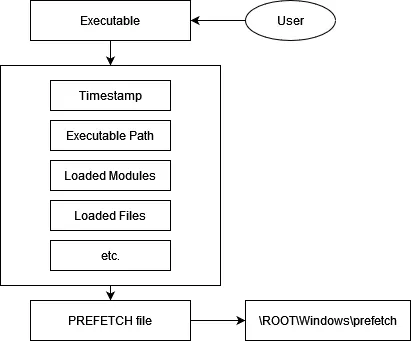
Because prefetch files are stored on disk and loaded into memory for performance reasons, they often persist inside a memory dump even after the process has terminated. This makes them a powerful forensic artifact for reconstructing execution history that volatile memory alone cannot provide.
Challenge Walkthrough
Step 1, Scanning for prefetch files in memory
Running pslist or pstree on the dump returns nothing suspicious. The malicious process has already exited.
The next step is to scan the memory for prefetch files directly using Volatility3's filescan plugin:
vol -f dump.dmp windows.filescan | grep ".pf"
Step 2, Identifying the suspicious prefetch entry
Scanning the list of .pf files reveals one that immediately stands out: Edge.exe. This looks like Microsoft Edge at first glance, but the real Edge process is named msedge.exe, not Edge.exe. A process masquerading under a nearly-identical name is a classic indicator of compromise.
Step 3, Analyzing the prefetch file with PECmd
After dumping the prefetch file from memory, analyze it with PECmd (Eric Zimmerman's prefetch parser):
The output shows that Edge.exe loaded files from the user's Documents folder and dropped .dll files into %localappdata%\temp, a highly suspicious pattern consistent with ransomware staging.
Step 4, Dumping Edge.exe and the encrypted files
With Edge.exe confirmed as the malicious executable, dump it from memory along with the encrypted files it created:
vol -f dump.dmp windows.dumpfiles --virtaddr {offset}
Step 5, Reverse engineering the encryption
Decompiling Edge.exe reveals the encryption logic:
The malware uses XOR encryption:
The key is randomized, but constrained to % 256, meaning it's a single-byte key with only 256 possible values. A simple brute-force over all 256 candidates is enough to recover the plaintext.
Step 6, Decrypting the file and retrieving the flag
Brute-force the XOR key and decrypt the file:
Flag: SNI{intr0_t0_df1r_and_th1s_g1rl_is_w4y_b3tter_than_Chizuru}
Takeaways
The intended lesson of this challenge: don't stop at pslist. When a process has already terminated, memory alone won't give you the full picture. Prefetch files bridge that gap, they record execution history that persists in memory long after the process is gone, and they contain exactly the kind of file and module activity you need to reconstruct what a piece of malware actually did.
Tools to keep in your DFIR toolkit for this:
- Volatility3
windows.filescan, locate prefetch files resident in memory - Volatility3
windows.dumpfiles, extract them for offline analysis - PECmd (Eric Zimmerman), parse and interpret prefetch file contents