International Cybersecurity Challenge (ICC) 2025 was held in Chiba, Japan, at Hotel New Otani Makuhari, November 11-14, 2025. This write-up is based on my simulation and replication of a forensics challenge from that event.
PJL Header
The file opens with \x1b%-12345X@PJL, the standard Printer Job Language prefix. PJL is a vendor-neutral wrapper most printer manufacturers use to encapsulate their proprietary PDLs. Everything before @PJL ENTER LANGUAGE is readable ASCII, making it a reliable source of forensic metadata even when the rest of the file is opaque binary.
@PJL JOB NAME = "flag.txt - \x83\x81\x83\x82\x92\xa0"
@PJL SET DATE = "2025/07/14"
@PJL SET TIME = "21:21:34"
@PJL SET DRIVERKINDINFO = RPCS
@PJL SET HOSTPRINTERNAME = "RICOH IM C2510 JPN RPCS"
@PJL SET HOSTNAME = "TSUJI"
@PJL SET HOSTLOGINNAME = "tsato"
@PJL SET HOSTPORTNAME = "IP_10.25.120.197"
@PJL SET PAPER = A4
@PJL SET RESOLUTION = 600
@PJL SET ROTATE = RIGHT
The job name suffix \x83\x81\x83\x82\x92\xa0 is Shift-JIS encoded, it decodes to メモ帳, the Japanese name for Notepad. The host printed from a machine named TSUJI over the network (IP_10.25.120.197).
Two fields drive the solve path: DRIVERKINDINFO = RPCS identifies the PDL, and HOSTPRINTERNAME combined with the version string in the first RPCS block (RPCS driver product version 1.3.0.0) pins down the exact driver on Ricoh's public support site. ROTATE = RIGHT will matter when interpreting glyph coordinates later.
Driver Analysis
The driver package ships with Cabinet-compressed DLLs. Expand the relevant one:
7z x driver/disk1/rici7Zgp.dl_ -o_expanded
Strings in _expanded/rici7Zgp.dll:
PrnPutCharBitmap
OutputCachedBitmap
mmrenc.cpp
scanlinev2.cpp
bitmap_comp_ex
mmrenc.cpp is the key. MMR, Modified Modified READ, is another name for CCITT Group 4 (ITU-T T.6), the compression standard used in Group 4 fax machines. Its presence here means RPCS renders each character into a 1-bit glyph bitmap and compresses it with G4 before writing it to the print stream. This is why no readable strings appear in a hex editor: the text has been turned into pixels and then compressed.
Data Parsing
A PJL file wraps one or more PDL payloads, each introduced by @PJL ENTER LANGUAGE = <name>. Ricoh RPCS files use two blocks: the first carries initialization data and glyph cache definitions; the second holds the actual page content. We want the last one.
eoj   = job.find(b"\x1b%-12345X@PJL EOJ")
enter = job.rfind(b"@PJL ENTER LANGUAGE = RPCS", 0, eoj)
start = job.find(b"\n", enter) + 1
payload = job[start:eoj]
| Item | Value |
|---|---|
| File size | 4837 bytes |
| First RPCS block | 0x8f7 |
| Second (final) RPCS block | 0xa22 |
| Final RPCS payload start | 0xa3d |
| EOJ marker | 0x12a8 |
| Payload length | 2155 bytes |
Glyph Chunk Format
Each character in the RPCS payload is stored as a self-contained binary chunk with a 10-byte header followed by compressed bitmap data:
lead[2]               , 2-byte identifier / metadata
width_be16            , glyph width in pixels (big-endian u16)
height_be16           , glyph height in pixels (big-endian u16)
compressed_length_be32, length of the G4 strip (big-endian u32)
compressed_data       , raw CCITT Group 4 compressed strip
Since RPCS has no public specification, chunk detection is heuristic. The scanner walks the payload byte by byte, treats each position as a candidate chunk header, validates that width/height/size values are plausible for a character glyph, then attempts an actual G4 decode. If it succeeds the chunk is accepted and the cursor advances past it; otherwise the cursor shifts by one byte and tries again.
def find_g4_chunks(payload: bytes):
    chunks = []
    offset = 0
    while offset < len(payload) - 10:
        width  = int.from_bytes(payload[offset + 2:offset + 4], "big")
        height = int.from_bytes(payload[offset + 4:offset + 6], "big")
        size   = int.from_bytes(payload[offset + 6:offset + 10], "big")
        if (1 <= width <= 256 and 1 <= height <= 128
                and 1 <= size <= 512
                and offset + 10 + size <= len(payload)):
            strip = payload[offset + 10 : offset + 10 + size]
            try:
                image = Image.open(BytesIO(g4_tiff(strip, width, height)))
                image.load()
            except Exception:
                pass
            else:
                chunks.append({"offset": offset, "lead": payload[offset:offset+2],
                                "width": width, "height": height, "size": size,
                                "image": image.convert("1")})
                offset += 10 + size
                continue
        offset += 1
    return chunks
CCITT Group 4 and the TIFF Wrapper
CCITT Group 4 is a lossless compression standard for 1-bit bilevel images, originally designed for Group 4 fax transmission. Unlike Group 3 which mixes 1D and 2D coding, G4 is purely 2D: each scanline is encoded as a set of run-length transitions relative to the scanline above it, exploiting the high vertical correlation typical in document images. The result is 10–30× compression on text content, which makes it well-suited for storing font glyph bitmaps.
Pillow supports G4 decoding only through the TIFF container, it won't accept a bare compressed strip. The fix is to build a minimal valid TIFF in memory. A single-strip G4 TIFF needs exactly eight IFD entries:
def g4_tiff(strip: bytes, width: int, height: int) -> bytes:
    entries = [
        (256, 4, 1, width),
        (257, 4, 1, height),
        (258, 3, 1, 1),           # BitsPerSample = 1
        (259, 3, 1, 4),           # Compression = CCITT Group 4
        (262, 3, 1, 0),           # PhotometricInterpretation = 0 (white = 0)
        (273, 4, 1, 0),           # StripOffsets, patched below
        (278, 4, 1, height),      # RowsPerStrip
        (279, 4, 1, len(strip)),  # StripByteCounts
    ]
    strip_offset = 8 + 2 + len(entries) * 12 + 4
    out = bytearray(b"II*\0" + pack("<I", 8) + pack("<H", len(entries)))
    for tag, typ, count, value in entries:
        if tag == 273:
            value = strip_offset
        encoded = pack("<H", value) + b"\0\0" if typ == 3 and count == 1 else pack("<I", value)
        out += pack("<HHI", tag, typ, count) + encoded
    out += pack("<I", 0)
    out += strip
    return bytes(out)
Pass this to Image.open(BytesIO(...)) and Pillow handles the G4 decode, no decoder from scratch needed.
Cached vs. Inline Glyphs
RPCS uses two glyph storage strategies.
Cached glyphs are defined once in the first RPCS block and referenced by a short ID throughout the page. Their lead bytes encode the character directly: lead[1] == 0x00 and lead[0] is the ASCII code. A cached 'r' has lead 72 00; a cached ',' has lead 2c 00. Identification is automatic during scanning.
Inline glyphs arrive as fresh bitmap chunks embedded directly in the placement stream, used for characters that aren't in the cache. Their lead bytes carry positional delta data rather than a character code (e.g., ff c1, 01 6f), so the actual character can only be determined by looking at the decoded bitmap.
The solver outputs a contact sheet of all decoded glyphs, rotated 90° to account for ROTATE = RIGHT, making visual identification of inline glyphs straightforward.
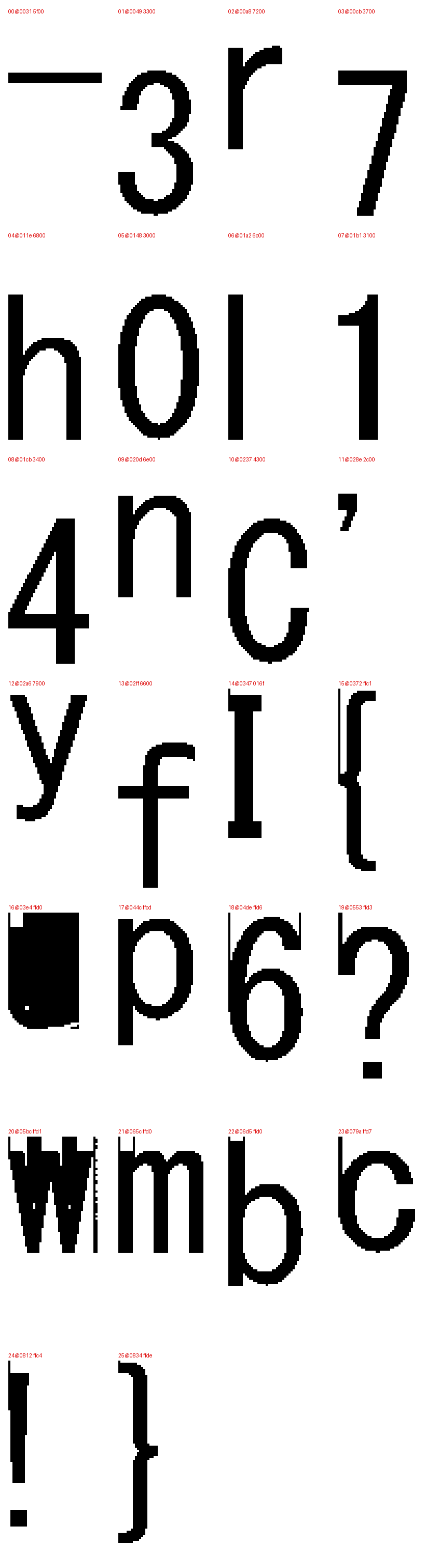
flag-txt.bin contains 26 chunks, 14 cached, 12 inline.
Cached Glyphs
| Offset | Lead | Char |
|---|---|---|
0x0031 | 5f00 | _ |
0x0049 | 3300 | 3 |
0x00a8 | 7200 | r |
0x00cb | 3700 | 7 |
0x011e | 6800 | h |
0x0148 | 3000 | 0 |
0x01a2 | 6c00 | l |
0x01b1 | 3100 | 1 |
0x01cb | 3400 | 4 |
0x020d | 6e00 | n |
0x0237 | 4300 | C |
0x028e | 2c00 | , |
0x02a6 | 7900 | y |
0x02ff | 6600 | f |
Inline Glyphs (identified from contact sheet)
| Offset | Lead | Char |
|---|---|---|
0x0347 | 016f | I |
0x0372 | ffc1 | { |
0x03e4 | ffd0 | u |
0x044c | ffcd | p |
0x04de | ffd6 | g |
0x0553 | ffd3 | ? |
0x05bc | ffd1 | w |
0x065c | ffd0 | m |
0x06d5 | ffd0 | b |
0x079a | ffd7 | c |
0x0812 | ffc4 | ! |
0x0834 | ffde | } |
Placement Commands
Three command opcodes in the RPCS payload position glyphs on the page. All coordinates are cumulative signed deltas from the previous pen position.
43 06, place a cached glyph. Applies dx and dy to the current pen position, then looks up the character by (char_id, sub_id) in the cached glyph table.
43 06 dx_be16 dy_be16 char_id sub_id
43 0c, place an inline glyph. Carries only dx; the dy is encoded in the lead bytes of the bitmap chunk that immediately follows in the stream.
43 0c dx_be16
<bitmap chunk>
43 02, first cached glyph on the page. Same structure as 43 06 but the pen position is not updated.
Coordinate System and Stream Order
The page is flagged ROTATE = RIGHT, rotating the entire coordinate system 90°. In RPCS space, character order along a printed line runs as descending y, the first character of the line has the highest y value.
Reading strictly in stream order gives:
ICC{h3ll0,_y0ur3_7h3_pr1n73r,_r1gh7?__w4y_m0r3_r3l14bl3_7h4n_7h3_0ff1c3_0n3!}
Note the double underscore before w4y. The driver emitted a duplicate _ glyph event at nearly the same position, a re-render artefact. Deduplication (≤3 px tolerance) removes it.
Since the printed content is a single line, all 77 glyph events fall into one x-cluster. Sorting by descending y within that cluster yields the correct left-to-right reading order:
def clustered_lines(events) -> list[str]:
    # 1. Deduplicate near-identical events (re-render artefacts, ≤3 px tolerance)
    unique = []
    seen = set()
    for event in events:
        key = (event["ch"], round(event["x"] / 3), round(event["y"] / 3))
        if key not in seen:
            seen.add(key)
            unique.append(event)

    # 2. Cluster events by x proximity (60 px threshold)
    clusters = []
    for event in unique:
        for cluster in clusters:
            if abs(cluster["x"] - event["x"]) <= 60:
                cluster["events"].append(event)
                cluster["x"] = sum(e["x"] for e in cluster["events"]) / len(cluster["events"])
                break
        else:
            clusters.append({"x": float(event["x"]), "events": [event]})

    # 3. Sort clusters top→bottom (ascending x), glyphs left→right (descending y)
    lines = []
    for cluster in sorted(clusters, key=lambda c: c["x"]):
        ordered = sorted(cluster["events"], key=lambda e: (-e["y"], e["offset"]))
        lines.append("".join(e["ch"] for e in ordered))
    return lines